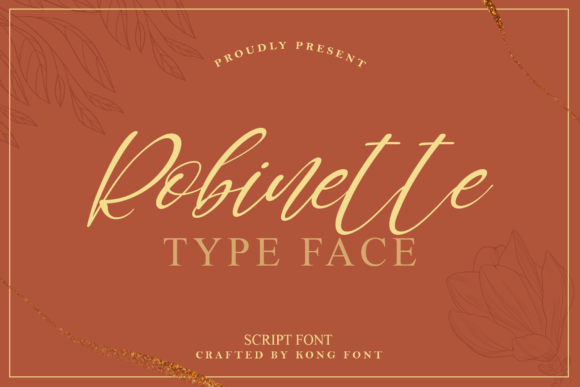
Robinette: A Sophisticated Script Font for Editorial Design
Robinette is a sophisticated script font designed for creators who value elegance without sacrificing clarity—especially bloggers, editorial designers, and digital product makers building cohesive, reader-focused content. As one of the most thoughtfully crafted Freebies in the Fonts category, Robinette delivers expressive flow and refined letterforms that elevate everything from newsletter headers to printable workbooks. Its subtle contrast, graceful terminals, and balanced spacing make it ideal for display use—not body text—ensuring strong visual hierarchy while preserving readability across formats.
Robinette for Magazine Covers and Editorial Branding
Robinette brings immediate sophistication to magazine covers and publication branding. When used for mastheads or issue titles—paired with a crisp serif like Adobe Garamond or a clean sans like Inter—it creates a confident, curated tone that signals quality before the first article begins. Because Robinette is a script font, it works best at larger sizes (36pt and up) with generous line spacing, allowing its delicate connections and natural rhythm to breathe. For print-ready PDFs or high-res web exports, test kerning adjustments manually in Photoshop or Silhouette Design Studio to fine-tune spacing between key words like “Spring” or “Essentials.” This attention to detail reinforces trust—readers subconsciously associate polished typography with authoritative, well-edited content.
Robinette for Ebook Titles and Chapter Openers
As a display font, Robinette excels in ebook titles and chapter openers—particularly in lifestyle, wellness, or creative nonfiction genres where warmth and personality matter. Unlike overly ornate handwritten fonts, Robinette avoids visual fatigue by maintaining consistent x-height and restrained flourishes. That makes it more legible on screens and in reflowable EPUBs than many decorative alternatives. Use it for front matter headings, section dividers, or pull-quote callouts within your ebook layout. Just remember: Robinette is not intended for long-form reading. Reserve it for moments of emphasis—where you want readers to pause, absorb, and feel the intention behind your design choices.
Robinette for Newsletter Headers and Social Media Quote Graphics
Robinette stands out in email newsletters and social media quote graphics because it conveys authenticity and craft—qualities your audience associates with trusted voices. Since it’s compatible with tools such as Photoshop and Silhouette Design Studio, you can easily layer it over textured backgrounds, apply subtle drop shadows, or convert outlines for SVG export. For newsletter headers, pair Robinette with a highly legible sans-serif (like Lato or Source Sans Pro) in your CSS or email builder to ensure accessibility and mobile responsiveness. On Instagram or Pinterest, use Robinette for short, resonant quotes—three lines max—to avoid crowding and maintain scannability. Its elegance supports emotional resonance without distracting from the message.
Robinette for Printable Guides, Workbooks, and Lead Magnets
Among Freebies in the Fonts space, Robinette offers rare versatility for printable guides and lead magnets—especially for coaches, educators, and course creators. Its script style adds tactile charm to worksheet headers, reflection prompts, and section labels in planners or habit trackers. When exporting to PDF, embed Robinette fully to preserve fidelity across devices. For printables intended for home printing, test on matte paper first: Robinette’s fine strokes reproduce cleanly at 100% scale but may thin out on low-DPI printers if scaled too small. Also verify that your version includes standard OpenType features—ligatures and stylistic alternates—since those enhance polish in hand-lettered–feeling layouts.
Robinette for Wedding Invitations and Elegant Branding
Though rooted in editorial use, Robinette’s grace translates seamlessly into wedding invitations, boutique branding, and luxury guidebooks—making it a quiet standout among script font Freebies. Its restrained curves and even weight distribution avoid looking overly cursive or juvenile, lending itself to timeless rather than trend-driven aesthetics. If you’re designing a seasonal editorial series—say, a spring wedding planning guide or a slow-living newsletter—you can unify the brand using Robinette for all cover treatments, chapter titles, and pull quotes, then anchor it with a neutral serif for captions and body copy. That consistency builds recognition across touchpoints, turning typography into part of your voice.
Robinette for Craft-Based Digital Products and Silhouette Design Studio Projects
For crafters and designers using Silhouette Design Studio, Robinette unlocks elegant cut files for greeting cards, framed prints, and layered vinyl decals—without requiring advanced vector editing. Its smooth outlines and moderate stroke variation translate cleanly to cutting paths, especially when exported as SVG or DXF with simplified nodes. Use it for monogrammed gift tags, recipe cards, or seasonal planner stickers where typographic charm meets functional design. Because Robinette is a Fonts Freebie, it lowers the barrier to professional-looking deliverables—ideal for launching digital shops, Patreon rewards, or Etsy printables. Just confirm licensing permissions before bundling Robinette into commercial templates or paid downloads.
Robinette Font Pairing Strategies for Blog Layouts and Digital Magazines
Robinette pairs most effectively with typefaces that provide contrast without competition. Try it with Merriweather for blog post titles (serif + script), or with Poppins for sidebar navigation and caption labels (sans + script). Avoid pairing Robinette with other scripts or overly decorative fonts—visual clutter undermines its strength. In multi-column digital magazines, use Robinette only for primary headlines and special feature banners; keep body copy in a tested, accessible serif or sans. And always preview how Robinette renders on iOS and Android browsers—some script fonts trigger fallback behavior unless properly embedded via @font-face or hosted service.
Robinette Licensing Considerations for Ebooks, Templates, and Client Work
While Robinette is offered as a Freebie, always review its license terms before using it in commercial Fonts applications—especially ebooks sold on Amazon KDP, Canva templates, Notion workspace bundles, or client-facing publications. Many free script fonts permit personal use but require a commercial upgrade for redistribution. If your workflow includes selling digital products or delivering branded assets to clients, confirm whether Robinette allows embedding, modification, or resale. When in doubt, treat Robinette as a starting point—then invest in an extended license or explore premium alternatives with broader usage rights.